Finding the door hardware schedule in a scanned drawing set
How ColPali matches a question to a sheet image, and where a project manager should check the revision before ordering hardware.
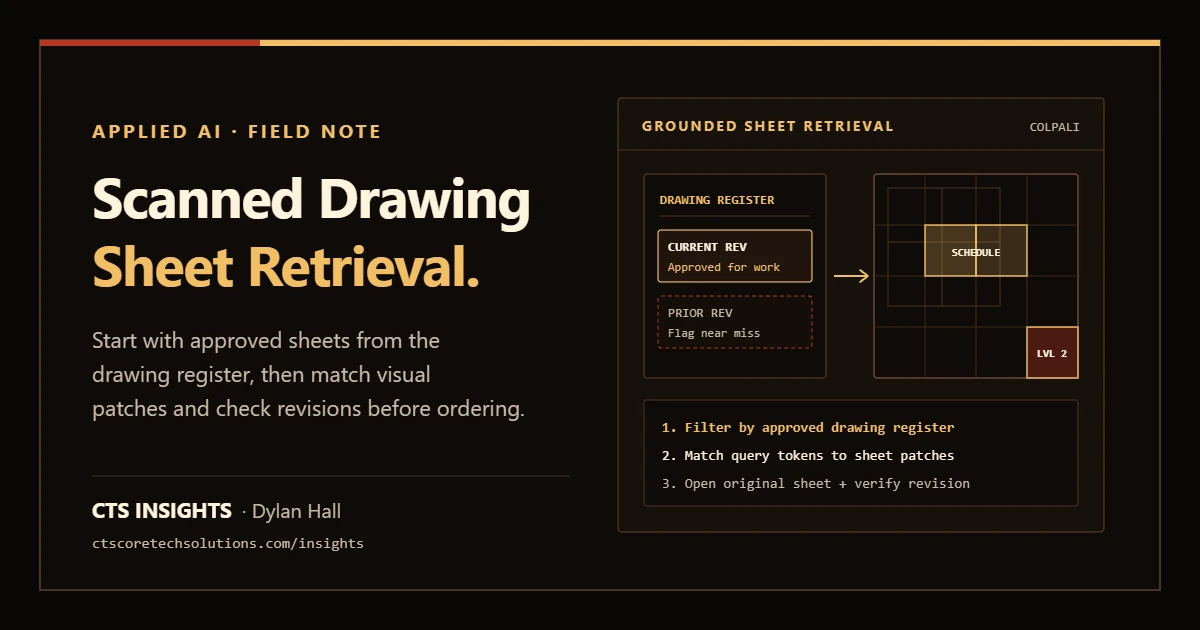
Which sheet has the Level 2 door hardware schedule? Suppose the drawing set is a stack of scanned pages. You can read the table heading on screen, but there’s no text layer for Ctrl+F to search. ColPali offers another way in. Give it the question and images of the pages, and it ranks the pages by how well they match. ColPali paper
Why a schedule and a floor label can both count
ColPali represents each small patch of a page as a vector, a list of numbers. It also represents the pieces of your question as vectors. For each piece, it finds its strongest match anywhere on the page. It adds those matches to get a page score. The model card shows the two inputs side by side in its example: questions on one side and document images on the other. Paper, section 4.1 · ColPali v1.3 model card
On a hypothetical sheet, the floor label might sit in the title block while the hardware schedule fills the center. Both places can contribute to the score. Now imagine the same sheet one revision earlier. It might match the question just as well, even if the hardware has changed.

Full sheet “Level 2” “door hardware”
What I’d put in front of the project manager
I’d start with the project’s drawing register and narrow the search to sheets approved for the work in question. I’d put the sheet number, revision and issue date beside each result, with a link that opens that exact sheet in the original set. If the register can’t establish which revision is current, I’d flag that for the person who controls the drawings.
Before using the search for an order, I’d try a deliberate near miss. Put an old schedule and its replacement in the set. Ask the Level 2 question, open the result and compare its revision with the register. That’s the check I’d want before anyone reads a hardware set number off the page.